
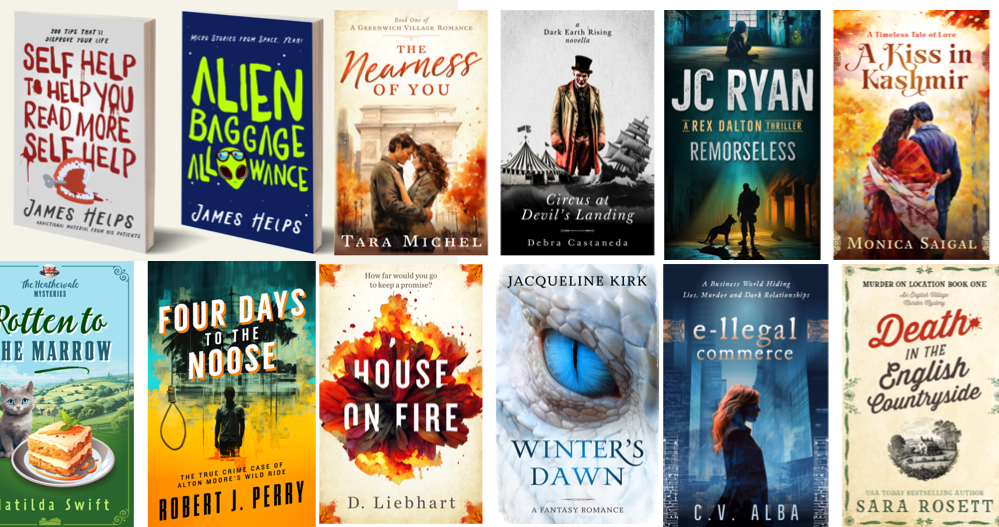
Discover the best AI image generators for book covers, children’s book illustrations, fantasy artwork, and self-publishing projects. Compare popular tools, learn how commercial-use licenses work, and find out what to check before publishing or selling AI-generated artwork.
Creating professional-looking book covers and illustrations used to require illustration skills, design software, or a substantial budget for hiring an artist. AI image generators have introduced another option: authors can describe a scene, explore visual styles, and produce artwork concepts in minutes.
These tools can be useful for independent authors, nonfiction writers, children’s book creators, and publishers experimenting with new visual directions. However, generating an attractive image is only part of the process. You also need to consider commercial-use terms, copyright limitations, image quality, typography, and the rules of the platform where you intend to publish.
This guide explains how to choose an AI art tool for book publishing, how the major options differ, and how to reduce licensing and design risks before releasing your book.
Best AI Tools to Create Book Covers and Illustrations
The right tool depends on your project. A fantasy novelist may prioritize cinematic scenes and imaginative characters, while a nonfiction author might need a clean cover with a simple visual metaphor. Children’s book creators may care more about consistent characters across multiple illustrations.
1. Adobe Firefly
Adobe Firefly offers generative image tools for exploring concepts and creating visual assets. Its wider Adobe ecosystem can be useful when you need to refine images, adjust compositions, or combine artwork with typography in design applications.
Good for: Authors who want to generate images and refine them in a broader design workflow.
Watch for: Feature-specific conditions, beta restrictions, and the terms that apply to any additional stock assets you use.
2. Midjourney
Midjourney is popular for highly stylized artwork, atmospheric environments, dramatic lighting, and visually rich concepts. It can be especially useful when exploring fantasy, science fiction, horror, or literary fiction cover directions.
Good for: Mood boards, visual exploration, and distinctive cover artwork.
Watch for: Subscription conditions, public visibility settings, third-party rights, and restrictions on particular uses.
3. Canva
Canva combines design templates, text tools, layout controls, and AI-powered features. It is convenient when you want to assemble a cover with a title, subtitle, author name, and supporting visual elements in one workspace.
Good for: First-time self-publishers and straightforward cover layouts.
Watch for: Content licensing rules. You generally cannot redistribute Canva content as a standalone asset, and your final design must comply with the applicable license.
4. Adobe Photoshop
Photoshop is useful for editing generated artwork, cleaning up details, combining layers, adjusting colors, and preparing a more controlled composition. Generative features can support the workflow, but traditional editing tools remain important.
Good for: Detailed finishing, compositing, and print-oriented design work.
Watch for: Separate licensing terms for any imported stock images, fonts, brushes, or other assets.
5. OpenAI image generation tools
OpenAI’s image-generation capabilities can help authors explore cover concepts, illustrate scenes, and iterate on visual ideas through natural-language instructions. The best results often come from describing the composition, subject, lighting, and intended audience precisely.
Good for: Iterative concept development and custom visual directions.
Watch for: The terms applicable to the service you use, and the fact that permission under platform terms does not automatically settle copyright or third-party rights.
6. Stable Diffusion and related tools
Stable Diffusion-based workflows can provide substantial flexibility for users who want more control over generation, models, settings, and local or hosted workflows. Setup and results depend heavily on the model and interface selected.
Good for: Technically confident creators who want a customizable workflow.
Watch for: Each model or checkpoint may have its own license. Do not assume all models allow commercial use just because the software is accessible.
AI Book Cover Tools Compared
Use this table as a starting point when choosing a workflow. “Check terms” means that you should verify the relevant service, plan, model, and asset licenses rather than assume every output has identical rights.
| Tool | Primary strength | Useful for | Commercial-use consideration |
|---|---|---|---|
| Adobe Firefly | Image generation and creative editing | Cover concepts, visual assets | Review feature-specific terms and any beta conditions. |
| Midjourney | Stylized, atmospheric artwork | Fantasy, sci-fi, dramatic covers | Review plan requirements and business revenue conditions. |
| Canva | Templates and page layout | Typography, simple covers, marketing assets | Follow content licensing rules; don’t resell standalone assets. |
| Photoshop | Image refinement and compositing | Final cover preparation | Check generative features and imported asset licenses. |
| OpenAI image tools | Prompt-based visual iteration | Custom concepts and scene illustrations | Check applicable terms and third-party rights. |
| Stable Diffusion ecosystem | Flexible model-based generation | Custom and technical workflows | Review the specific model license and any dependencies. |
Which tool should you choose?
- For a fantasy novel: Start with an image generator suited to dramatic environments and imaginative scenes, then refine the result in a design editor.
- For a nonfiction book: Prioritize readability, a clear visual concept, and precise typography. A design-focused tool may be more useful than the most elaborate image generator.
- For a children’s book: Test character consistency, age-appropriate visuals, and the ability to maintain a recognizable look across multiple scenes.
- For a print-on-demand book: Choose a workflow that lets you control dimensions, image resolution, bleed, spine width, and export settings.
How to Create a Professional Book Cover With AI
A strong cover communicates genre, mood, and the book’s central promise. AI can help create the artwork, but you still need to make deliberate design choices and check the final file.
Step 1: Define the audience and genre
Write down who the book is for, what readers expect from the genre, and the mood the cover should communicate. A cozy mystery, a business guide, and an epic fantasy novel require very different visual approaches.
Step 2: Create a visual brief
Specify the main subject, setting, composition, lighting, color palette, and space needed for the title. If the cover needs a subtitle or author name, tell the image generator to leave those areas uncluttered rather than relying on generated text to render them correctly.
Step 3: Generate several concepts
Explore multiple compositions rather than repeatedly polishing the first image. Try different camera angles, focal points, lighting, and negative space. Compare the images at thumbnail size because many readers first encounter a book on a small screen.
Step 4: Refine the strongest image
Check for distorted hands, inconsistent objects, strange facial features, accidental text, and details that do not match the story. Correct the problems using the generator’s editing features or a separate image editor.
Step 5: Add typography separately
Use a design application to add the title, subtitle, author name, and other text. Ensure the title is readable, the font fits the genre, and the text contrasts with the background. Check the font’s license if you plan to distribute the book commercially.
Step 6: Prepare the final publishing file
Download the correct template and specifications from your chosen publisher or printer. A full paperback cover may need a front cover, back cover, spine, bleed, and a specific PDF format. An ebook cover has different requirements. Never rely on a generic image dimension when the platform provides an exact template.
AI Prompts for Book Covers and Illustrations
Detailed prompts help you communicate a visual direction. The examples below are starting points: customize them for your manuscript, target audience, and desired format.
Prompt 1: Fantasy novel cover
Prompt 2: Nonfiction business book
Prompt 3: Children’s picture book illustration
Prompt 4: Consistent illustrations for a series
Prompt 5: Interior illustration for a fantasy chapter
Reusable book artwork prompt builder
Choose the type of artwork and style, then generate a prompt you can copy into your preferred image tool.
Commercial Use Rules: Can You Sell Books With AI-Generated Art?
In many cases, AI-generated images can be used in commercial projects, including book covers and illustrations. However, there is no single license that applies to every image generator. Your permissions may depend on the provider, subscription plan, specific model or feature, third-party content, and the law that applies to your work.
Before publishing, separate these four questions:
- Does the service permit commercial use? Review the current terms for your account, plan, and feature.
- Do you have rights to all the elements? Check reference images, fonts, stock assets, logos, and other materials used in the design.
- Is the image eligible for copyright protection? This is a separate legal question that depends on applicable law and the degree of human authorship.
- Does the publisher allow the content? Check the rules of your ebook marketplace, print-on-demand provider, distributor, or publisher.
Adobe Firefly: Review the specific feature and terms
Adobe states that outputs from Firefly features without a beta label can be used in commercial projects. Outputs from beta features may also be used commercially unless the product explicitly says otherwise. Other conditions and third-party rights still apply.
Read Adobe’s Firefly FAQ and commercial-use guidance.
Midjourney: Check plan requirements and exceptions
Midjourney’s published guidance generally permits commercial use of images you create, subject to its terms. Its rules include a Pro or Mega plan requirement for companies with more than US$1 million in annual gross revenue. Images created or upscaled from another user’s work can raise different ownership issues. Review the current terms before relying on an output for a book launch.
Read Midjourney’s commercial-use guidance.
Canva: License the complete design correctly
Canva permits many commercial uses of designs, but content elements have licensing conditions. Its guidance says designs for sale should be original compositions and that Canva content should not be resold as a standalone asset. Review the Content License Agreement and the terms relevant to the specific elements in your cover.
Read Canva’s guidance on products for sale.
Stable Diffusion: Check the exact model license
Stable Diffusion describes an ecosystem rather than one universal licensing arrangement. The applicable terms may differ between models, model versions, hosted services, and third-party checkpoints. Confirm that the specific model allows your intended commercial use, and check any separate conditions for the interface or hosting service.
Visit Stability AI for current model and product information.
Commercial use versus copyright ownership
Permission to use an image commercially does not necessarily mean that the image qualifies for copyright protection or that you have exclusive rights over every element. In the United States, the U.S. Copyright Office has explained that copyrightability of AI-assisted works depends on human authorship and the circumstances of the work. Other jurisdictions may apply different rules.
Human creative contributions—such as original writing, meaningful selection and arrangement, compositing, and substantial manual editing—may matter to the copyright analysis, but the outcome is fact-specific. Simply entering a prompt or making minor adjustments does not guarantee exclusive copyright protection.
Read the U.S. Copyright Office’s resources on artificial intelligence.
Avoid copyright and trademark trouble
- Do not request a cover that copies a specific existing book cover or uses a protected character without authorization.
- Avoid generating images designed to imitate a living artist’s distinctive style when doing so could create legal or ethical concerns.
- Do not use another author’s cover, illustration, or reference image unless you have the necessary rights.
- Check for unintended logos, brand marks, recognizable characters, and accidental text in generated artwork.
- Keep records of your prompts, source files, editing process, and the terms that applied when you generated the image.
AI Art and Self-Publishing Platforms
Even when your image generator allows commercial use, the publisher may impose separate requirements for AI-generated content, image quality, file preparation, or disclosure.
Amazon Kindle Direct Publishing (KDP)
KDP distinguishes between AI-generated and AI-assisted content in its content guidelines. Its current guidance says publishers must inform KDP about AI-generated text, images, or translations, including AI-generated cover and interior images. AI-assisted content—where you create the original content and use AI to edit, refine, or brainstorm—has different treatment under the policy.
Review the latest KDP requirements before uploading, especially if AI produced any part of your cover or interior artwork.
Read KDP’s AI-generated content guidance.
Print quality matters as much as licensing
A legally usable image can still be unsuitable for printing. Before submitting your files, check:
- Resolution: Follow the printer’s required dimensions and resolution for the final trim size.
- Bleed: Extend artwork beyond the trim edge when the printer’s template requires it.
- Spine width: Calculate it from the platform’s template and the final book specifications.
- Color: Check the printer’s color and export requirements.
- Legibility: Make sure the title, author name, and other text remain readable at the intended size.
- Image artifacts: Inspect hands, faces, lettering, patterns, and repeated details at full size.
For illustrated books, review every image at its actual print dimensions. Small defects that are easy to miss on a laptop can become obvious on a printed page.
AI Artwork Commercial-Use Checklist
Use this checklist before selling a book with AI-generated cover art or illustrations. Completing it does not constitute legal clearance, but it helps you identify common issues.
0 of 8 checks completed
How to Build a Consistent Illustration Style for a Book Series
One illustration is relatively straightforward. Producing dozens of images that look like they belong to the same book is more difficult. Characters may change appearance, colors may drift, and the composition may vary between scenes.
To improve consistency, create a reference sheet before generating the full set of illustrations. Record each main character’s appearance, clothing, proportions, color palette, and distinctive features. Keep a style guide describing line quality, lighting, textures, perspective, and the overall mood.
Use reference images or character-consistency features only in ways permitted by the tool and only when you have the necessary rights to the reference material. Generate a small test batch first, compare the results, and refine your instructions before producing an entire book.
For a professional release, consider combining AI-generated concepts with manual editing or commissioning an illustrator to correct inconsistencies. This can be especially important for children’s books, where readers notice character changes from one page to the next.
Frequently Asked Questions
Can I sell a book with an AI-generated cover?
Often, yes, if the tool’s current terms allow commercial use and you comply with the publisher’s rules. You must also consider third-party intellectual property rights and the legal status of the image. Check the specific service terms and the requirements of your chosen publishing platform before release.
What is the best AI tool for book cover design?
The best choice depends on the project. Midjourney can be useful for stylized and atmospheric artwork, Adobe Firefly for image generation and editing workflows, and Canva for assembling artwork with typography and templates. Test tools against your genre, budget, technical needs, and licensing requirements.
Do I own the copyright to AI-generated illustrations?
Not automatically in every jurisdiction. Platform terms may permit you to use an output commercially, but copyright protection depends on applicable law and the degree of human authorship involved. Review the relevant legal guidance if exclusive rights are important to your publishing business.
Do I have to disclose AI-generated cover art on Amazon KDP?
KDP’s published content guidelines distinguish AI-generated content from AI-assisted content. They require disclosure of AI-generated images, including cover and interior images. Check KDP’s current policy before submitting because platform requirements may change.
Can I use AI-generated illustrations inside a children’s book?
Potentially, provided the tool’s terms and your publishing platform’s rules allow it. Review each illustration for age-appropriate content, consistent characters, image quality, and any third-party rights issues. You may need manual corrections to maintain a coherent visual style throughout the book.
Can I use AI-generated art for a paperback and an ebook?
Usually, if your license permits both uses and you prepare each format correctly. Ebook covers and full paperback covers have different technical requirements. Check the publisher’s templates, image dimensions, bleed, spine width, and export specifications before uploading.
Can I use a famous character or imitate an existing book cover?
Doing so may raise copyright, trademark, or other legal issues. Avoid using protected characters, logos, or close copies of existing covers unless you have appropriate permission or another valid legal basis. A safer approach is to describe the genre, mood, composition, and visual elements you want without copying a specific work.
Should I keep records of my AI-generated artwork?
Yes. Save relevant prompts, original files, edited versions, tool and model details, and copies or records of applicable licensing terms. These records can help you document your workflow and investigate questions about permissions later.
Final Thoughts: Choose the Tool, Check the License, and Finish the Design
AI image generators give authors new ways to explore book covers and illustrations without starting every concept from scratch. The best results come from combining a suitable tool with a clear creative brief, careful editing, and an understanding of commercial-use conditions.
Before publishing, verify the terms for the exact tool and plan, check third-party assets, review platform disclosure requirements, and prepare the final artwork to the publisher’s specifications. Treat AI as part of your creative workflow—not as a substitute for design judgment, rights clearance, or quality control.