

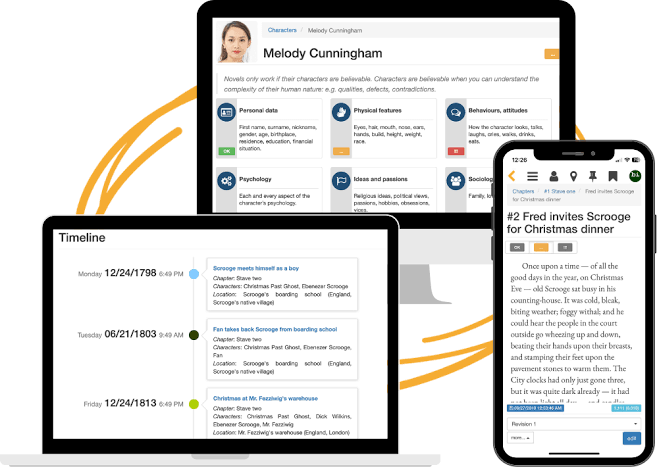
Choosing the best writing software for a novel can make a real difference to your creative workflow. The right app can help you organize chapters, develop characters, track your daily word count, revise complicated storylines, and prepare a polished manuscript for publication.
But not every writing program does the same job. Some are designed for drafting and outlining, others focus on editing, and specialized publishing tools turn finished manuscripts into professional ebooks and print interiors.
This guide compares the leading options for novelists in 2026, including Scrivener, Atticus, Vellum, Reedsy Studio, Dabble, and general-purpose writing and editing tools. You’ll also find a practical selector to help you choose software based on your budget, computer, and publishing goals.
Best Novel Writing Software in 2026: At a Glance
The best choice depends on whether you’re drafting a first novel, managing a long series, editing a completed manuscript, or self-publishing multiple books. The table below focuses on the primary use case for each tool rather than claiming one app is best for every writer.
| Software | Best for | Platforms | Pricing model | Main strength |
|---|---|---|---|---|
| Scrivener | Complex novels and series | Mac, Windows, iOS/iPadOS | One-time purchase | Outlining, research, scene organization |
| Atticus | Indie authors who write and format | Browser-based, cross-platform | One-time purchase | Writing plus ebook and print formatting |
| Vellum | Polished self-published book interiors | Mac | One-time purchase | Professional ebook and print design |
| Reedsy Studio | Budget-conscious new authors | Web browser | Core features free | Drafting, collaboration, EPUB and print PDF |
| Dabble | Writers who prefer a guided, cloud-based workflow | Web and supported devices | Subscription options | Story planning and accessible drafting |
| Microsoft Word | Traditional publishing submissions | Windows, Mac, web, mobile | Plan or license dependent | DOCX compatibility and editing workflows |
| ProWritingAid | Style and manuscript-level editing | Desktop, web, integrations | Free and paid options | Detailed style and readability reports |
Pricing and features can change. Subscription availability, operating-system support, export formats, and licensing terms should be verified on each provider’s official website before purchasing.
Find the Best Novel Writing Software for Your Needs
Answer these short questions to get a practical recommendation based on your current writing process.
Novel writing software selector
1. Scrivener: Best for Organizing Complex Novels
Scrivener is one of the best-known writing applications for long-form projects. Instead of forcing an entire novel into one enormous document, it lets you work with smaller sections that can be rearranged, revised, and expanded as the story develops.
That approach is particularly helpful when you’re writing a mystery with multiple clues, a fantasy novel with extensive worldbuilding, or a series with recurring characters and complicated timelines.
What makes it useful?
- Organize chapters and scenes separately.
- Use corkboard and outline-style views to plan a story.
- Keep research, notes, and reference materials alongside the manuscript.
- Compile a draft into different output formats.
- Track writing progress and preserve snapshots of drafts.
Potential drawbacks
- New users may need time to learn its features.
- Formatting and compilation settings can require experimentation.
- Licenses are platform-specific, so check requirements before buying.
- Cross-device syncing requires careful setup rather than assuming every device shares a live cloud document.
Pricing: The official website currently lists standard macOS and Windows licenses at approximately US$59.99 each, with a separate iOS/iPadOS app and a discounted desktop bundle. Check the current price and system requirements before purchase.
Best for: Plotters, research-heavy fiction writers, multi-POV novels, fantasy authors, and writers managing several books in a series.
2. Atticus: Best for Writing and Formatting Self-Published Books
Atticus combines a book-writing editor with tools for preparing professional ebook and print interiors. It’s designed for authors who want to move from manuscript to publication without buying a Mac just to use specialized formatting software.
Its browser-based approach supports authors using different desktop operating systems, making it an appealing option for independent publishers who work across Windows, Mac, Linux, or Chromebook environments.
Key features
- Write and organize chapters.
- Track word counts and writing goals.
- Choose and customize book formatting themes.
- Preview the appearance of a book before export.
- Produce ebook and print-oriented files.
What to consider
- It is a paid product rather than a permanently free formatter.
- Authors who already love their drafting app may only use Atticus for formatting.
- Compare the export formats with the exact requirements of your publisher or distributor.
- Check its current browser, offline, and device requirements before relying on it while traveling.
Pricing: Atticus currently advertises a one-time purchase of around US$147 for writing and ebook/print formatting, with ongoing updates included under its stated offer. Confirm current terms directly with the provider.
Best for: Self-published authors who want a combined writing and formatting tool, particularly those who use Windows or don’t want a Mac-only workflow.
3. Vellum: Best for Beautiful Ebook and Print Formatting on Mac
Vellum focuses on book production rather than trying to be an all-purpose creative writing environment. Authors typically bring in a finished manuscript, choose a design, adjust the book’s structure, preview the result, and generate publishing files.
For novelists who release several books a year, consistent professional formatting can save time and help a series maintain a recognizable visual style.
Why authors choose Vellum
- Purpose-built ebook and print interior design.
- Ready-made styles for chapter openings and other book elements.
- Previewing tools for checking the finished layout.
- Outputs designed for common self-publishing workflows.
Limitations to know
- Vellum is designed for Mac and is not a native Windows application.
- It is primarily a formatting tool, not a replacement for a full story-planning system.
- Advanced print output requires the appropriate license.
- The upfront cost may be difficult to justify for a single experimental project.
Pricing: Vellum has separate ebook and ebook-plus-print license options. Recent listed prices are approximately US$199.99 for ebooks and US$249.99 for ebooks and print, but verify the current price and conditions before purchasing.
Best for: Mac users who self-publish regularly and care about polished, consistent interiors for ebooks and print editions.
Visit the official Vellum website
4. Reedsy Studio: Best Free Writing and Book Formatting Software
Reedsy Studio is a browser-based tool that combines manuscript drafting, chapter organization, collaboration, writing goals, and book formatting. Its core writing and formatting functions are available free, which makes it an excellent starting point for new novelists.
You can organize your manuscript into sections and chapters, share drafts with collaborators, and export an EPUB for digital publication or a print-ready PDF for print-on-demand workflows.
Advantages
- No upfront purchase is required for the core writing and formatting features.
- Its chapter-based editor is approachable for first-time authors.
- Collaboration features can help with feedback and revision.
- Book layout is integrated into the writing process.
- It works in a browser across supported devices.
Limitations
- The core application currently requires an internet connection; it does not offer a full offline writing mode.
- Formatting customization is simpler than in some paid specialist tools.
- Some advanced writing goals, history, and outlining capabilities are offered as paid add-ons.
Best for: Beginners, budget-conscious novelists, collaborative projects, and authors who want to draft and format a book without purchasing several apps.
5. Dabble: Best for a Guided, Cloud-Based Writing Workflow
Dabble is a writing application aimed at novelists who want a straightforward place to draft, plan, and keep story information organized. Its appeal is the ability to work with a manuscript and its supporting story materials without building a complicated custom system.
For writers who prefer an approachable interface over a large collection of advanced controls, a focused novel-writing tool can help reduce distractions and keep the project moving.
What to look for
- Chapter and scene organization.
- Story planning and notes for characters or settings.
- Word-count tracking and writing goals.
- Access across the devices you regularly use.
- Export options that fit your editing and publishing workflow.
Potential drawback: Subscription costs can add up over a long writing project. Compare the current plans with one-time-purchase alternatives, and check how offline access and backups work before committing.
Best for: Novelists who prefer a guided writing environment and want their planning materials close to their manuscript.
6. Editing Software That Helps Improve Your Novel
Writing software helps you create and organize your manuscript, but editing tools focus on clarity, grammar, readability, repeated words, and sentence-level issues. They can be useful during revision, although no automated tool can replace a careful human edit.
ProWritingAid
ProWritingAid offers grammar checks and detailed reports that can help identify repeated words, sentence-length patterns, readability issues, and stylistic habits across longer documents. Novelists may find it particularly useful during a line-editing pass.
Best for: Writers who want detailed feedback on prose style and recurring writing habits.
Grammarly
Grammarly focuses on grammar, spelling, clarity, tone, and related writing assistance. It can be useful for emails, proposals, marketing copy, and sections of a manuscript, depending on the workflow and plan you choose.
Best for: Authors who want broad writing assistance across several apps and types of content.
Hemingway Editor
Hemingway Editor highlights sentence patterns that may be difficult to read, including complex constructions and excessive adverbs. Use it as a diagnostic aid, not as a rulebook: literary fiction, dialogue, and a distinctive narrative voice may deliberately use long or unconventional sentences.
Best for: Authors who want to spot overly complicated prose and review readability.
7. Is Microsoft Word Still Good for Writing a Novel?
Yes. Microsoft Word remains a practical choice, particularly if your editor, agent, publisher, or writing group expects DOCX files. It provides familiar formatting, comments, tracked changes, and document-sharing options.
However, a very long manuscript can become harder to manage if you frequently move scenes around, maintain extensive character notes, or track multiple storylines. You can still write a novel in Word, but you may need separate documents, consistent heading styles, and a careful backup routine.
Best for: Authors working with traditional publishers, editors who rely on tracked changes, and writers who prefer familiar word-processing software.
8. How to Choose the Right Software for Your Writing Workflow
The most effective setup often uses one main writing application and one or two supporting tools. You do not need to buy every product on the market to finish a novel.
First-time novelist
Start with: Reedsy Studio or Word.
Focus on completing a draft before investing in advanced features. Add editing software when you reach the revision stage.
Plot-heavy fiction
Start with: Scrivener.
Keep scenes, character notes, research, and alternate drafts organized in one project.
Self-publishing author
Start with: Atticus or Reedsy Studio.
Use a book-focused formatting workflow to create ebook and print files, then inspect the exported files carefully.
Mac-based series author
Start with: Scrivener for drafting and Vellum for formatting.
Separate creative organization from final book production, and keep a clean, backed-up manuscript ready for export.
Step 1: Decide what problem you need to solve
If you lose track of scenes, choose stronger organization. If your manuscript is complete but difficult to read, prioritize editing. If the writing is finished but the book looks unprofessional, focus on formatting.
Step 2: Test the workflow with a real chapter
Before purchasing, import or draft a representative chapter. Try adding a scene, changing its position, editing it, and exporting it. This small test often reveals more than a feature list.
Step 3: Check platform compatibility and backups
Confirm that the software supports your computer and preferred devices. Learn how projects are backed up and exported, especially if the application uses cloud storage or requires an internet connection.
Step 4: Calculate the total cost
Compare the purchase price or subscription over the period you expect to use it. A one-time license may be economical for long projects, while a subscription can be reasonable if the tool significantly improves your productivity.
Step 5: Keep your manuscript portable
Export periodic copies in a widely usable format such as DOCX or another supported interchange format. Keep a separate backup. This reduces dependence on a single application and makes it easier to work with editors or change tools later.
9. Novel Writing Software Buying Checklist
Before purchasing a writing app, make sure it supports the features that matter to your project.
0 of 7 items checked.
Frequently Asked Questions
What is the best writing software for novelists in 2026?
Scrivener is a strong choice for organizing long manuscripts and complex story structures. Atticus is useful for authors who want writing and book formatting in one cross-platform tool. Vellum is a popular option for Mac-based book formatting, while Reedsy Studio offers core writing and formatting features free. The best choice depends on your workflow and budget.
Is Scrivener better than Atticus?
They serve different priorities. Scrivener focuses on drafting, research, outlining, and organizing complex projects. Atticus combines writing with publishing-oriented ebook and print formatting. Some authors use Scrivener to draft and Atticus to produce the final book files.
Is Vellum available for Windows?
Vellum is a Mac application, so Windows users generally need another formatter. Atticus and Reedsy Studio are alternatives worth comparing, depending on your formatting needs and whether you prefer a paid or free solution.
What is the best free software for writing a novel?
Reedsy Studio is a strong free starting point because its core writing and formatting functions include chapter organization and export to EPUB and print-ready PDF. Other free or already-available tools can also work, especially if you only need a straightforward manuscript editor.
Can I write a novel in Microsoft Word?
Yes. Word supports long documents, headings, comments, tracked changes, and DOCX sharing. A dedicated novel-writing app may make it easier to reorganize scenes and manage research, but it is not mandatory for writing a publishable book.
Do I need separate writing and formatting software?
No. Tools such as Atticus and Reedsy Studio combine writing and formatting features. Some authors nevertheless prefer a dedicated drafting app and a separate formatter because they want more control over manuscript organization or book design.
Can writing software help me publish on Amazon KDP?
Writing applications can help you prepare manuscript and interior files, but they do not guarantee acceptance or publish your book automatically. Review the current Amazon KDP specifications for ebook and paperback files, then inspect your exported manuscript and preview it before submission.
Should I use AI writing software to write my novel?
AI-assisted tools can help with brainstorming, outlining, research organization, or editing, but authors should review outputs carefully for originality, factual accuracy, consistency, and voice. Check the software’s privacy terms, content rights, and any publisher or retailer rules that apply to your work.
How much should I spend on novel-writing software?
You can begin with free tools and upgrade only when a specific limitation slows you down. Compare the total cost over your expected writing period, including subscriptions, formatting tools, and any required upgrades. A higher price does not automatically mean a better fit for your workflow.
Final Verdict: Which Novel Writing App Should You Choose?
The best writing software for novelists in 2026 is the one that helps you finish, revise, and deliver your book without making the process more complicated than it needs to be.
- Choose Scrivener if you need detailed control over scenes, research, and complex manuscripts.
- Choose Atticus if you want to write and format self-published books across different computer platforms.
- Choose Vellum if you’re a Mac user who prioritizes polished ebook and print interiors.
- Choose Reedsy Studio if you want a free way to draft, collaborate, and format a book.
- Choose Dabble if you prefer a guided, cloud-based novel-writing workflow.
- Add an editing tool when you need a dedicated review of grammar, clarity, and style.
Before spending money, test your top choice with an actual chapter. Make sure you can write comfortably, reorganize your story, back up your work, and export a manuscript that suits your publishing plans. Then stop comparing tools and get back to writing your novel.